The best Splitwise alternatives in 2026
Almost everyone arrives here for the same reason: the free plan stopped letting them add expenses. Here is what actually replaces it, depending on what your group is tracking.
If you hit Splitwise’s daily expense cap, the fix is an app whose free plan limits groups rather than entries. Expenso is the closest replacement for a household or couple: unlimited expenses and unlimited members across two active groups, with saved splits and multi-currency. Tricount suits a one-off trip where nobody wants to make an account. Settle Up is the most capable ad-supported free plan. Splid is the pick when the group will be offline. Staying on Splitwise is still the right answer if you need many separate groups open at once and rarely log more than a couple of expenses a day.
- Every free plan is capped somewhere. The only question is whether it is capped on a dimension you use — entries per day, number of groups, or features.
- Households hit entry caps; travellers hit them harder. A four-person trip logs a dozen expenses on a travel day.
- Recurring bills are the feature most people forget to check for, and the one that decides whether the app survives past month two.
- Migration is not a data-export problem. Settle the current month in the old app, then start the next month in the new one.
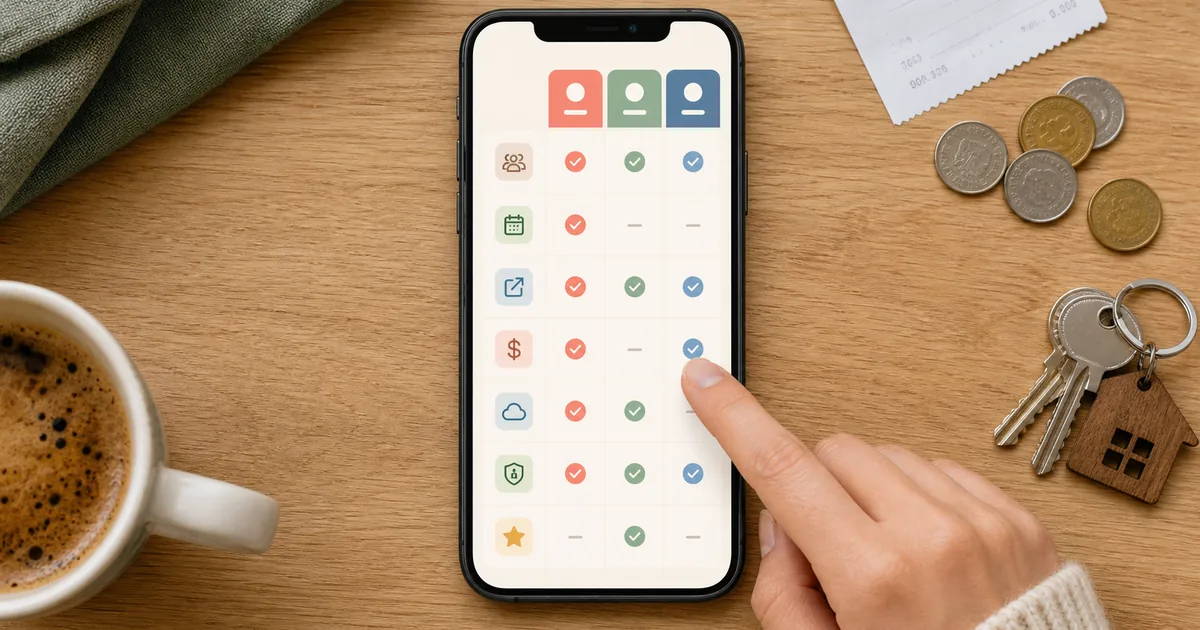
- The app your group will actually open matters more than any feature in the table below.
Splitwise is a good product, and this is not a piece arguing otherwise. But it made a specific trade in its free tier — unlimited groups, limited entries per day — and that trade is wrong for the two largest groups of people who use expense splitters: households that log several small costs a day, and travellers who log a whole day of costs in one sitting on the way back to the hotel.
If that is why you are here, the replacement you want is an app that caps a dimension you do not care about. Below is what each of the main options actually gives away, and where each one stops.
The five options compared
| App | What the free plan gives you | Where it stops | Best for |
|---|---|---|---|
| Expenso | Two active groups, unlimited members, unlimited expenses — no daily entry cap. Equal, exact, percentage and share splits, simplified debts, multi-currency. | Two active groups. Recurring expenses, receipt attachments, offline entry and PDF export are on the paid plan. | Households, couples and a regular trip crew — a small number of long-running groups. |
| Splitwise | Unlimited groups, the split types most people need, and the largest installed base of people who already know the app. | A cap on how many expenses you can add per day. Receipt scanning, search, currency conversion and charts sit behind Pro. | People who keep a dozen groups open and log expenses infrequently. |
| Tricount | Shared expense lists that work without every participant creating an account — you can send a link and start. | Built for one list at a time rather than long-running household bookkeeping. Fewer controls for saved or recurring splits. | A single trip, a stag do, a one-off event with a loose group. |
| Settle Up | The most generous ad-supported free tier: weighted splits, multiple payers on one expense, currency conversion and CSV export. | Ads on the free tier, and an interface that assumes you enjoy the detail. | Groups that want fine-grained splitting without paying. |
| Splid | Works with no account and no connection — expenses entered offline and reconciled when the group is back in range. | Deliberately minimal: no long-term bookkeeping, no recurring bills, little beyond the list itself. | Travel with patchy signal, or a group that will not install anything requiring signup. |
Capability-level comparison only — no prices are quoted here because plans in this category change several times a year. Check each provider’s current pricing page before you commit a group.
The four things worth checking before you switch
| Feature | Expenso | Splitwise |
|---|---|---|
| Unlimited expenses on the free plan | SupportedUnlimited, no daily cap | Partially supported~Free plan caps entries per day |
| Groups on the free plan | Partially supported~2 active groups | SupportedNo group limit |
| Recurring expenses with a saved split | Partially supported~Expenso Pro | SupportedRecurring expenses supported |
| Offline expense entry | Partially supported~Expenso Pro — syncs when you reconnect | Partially supported~Check current plan details |
| Multi-currency groups | SupportedYes | SupportedYes |
| Paid plan price | Supported$2.99/mo or $19.99/yr | SupportedSee Splitwise pricing |
Head-to-head against the app most people are leaving. For the longer version, see the full [Expenso vs Splitwise comparison](/blog/expenso-vs-splitwise).
- Which dimension is capped. Entries per day, active groups, or features. Pick the app that caps the one your group does not use.
- Whether recurring bills are supported. Rent and utilities are the same split, between the same people, twelve times a year. An app that cannot hold that split is an app someone re-enters by hand every month until they stop.
- What happens offline. If the group travels, entry has to work with no signal and reconcile afterwards. This is the single most common cause of a half-abandoned trip ledger.
- Whether everyone will install it. One holdout means the shared record is incomplete, which is worse than no shared record at all.
Who each one is for
- You log several shared costs a day and refuse to meet a daily entry cap.
- You run one or two long-running groups — a flat, a couple, a regular trip crew.
- You split by room size or income and want the percentages saved rather than retyped.
- You want recurring bills, receipts and offline entry in one paid plan at $2.99/mo.
- It is one trip, not an ongoing arrangement.
- Half the group will not create an account for a four-day holiday.
- You need entry to work with no signal.
- Nobody intends to open the app again after the settle-up.
- You keep many separate groups open and need more than two.
- Everyone already has it and the balances are live.
- You add a couple of expenses a day at most, so the cap never bites.
- You are mid-lease and moving the history costs more than it saves.
How to move a group without losing the balances
- Settle the current period in the old app first. Do not migrate an open balance. Close the month where it started, so the number everyone agreed on is the number everyone agreed on. Nothing causes more distrust than a balance that changed shape during a move.
- Export the history for the record, not for import. Take the CSV or PDF and keep it somewhere shared. Treat it as an archive of a closed period. Attempting a full import is where most migrations stall, and it buys you very little.
- Create the group in the new app before you announce it. Set the currency, add the members, and enter one real expense so the first thing anyone sees is a working group rather than an empty one.
- Move the recurring items over deliberately. Rent, utilities, the internet bill, the shared subscriptions. These are the entries that make the app stick; re-create them with the same split percentages you were already using.
- Start the next period clean, and say so once. One message: the old app is closed at zero, the new one starts today, here is the link. Groups tolerate exactly one migration announcement.
The best expense app is the one the least motivated person in the group will still open in month three.
If you have not decided what you are optimising for yet, work through how to choose a bill-splitting app first — the decision is usually about your group, not about the software. And if the reason you are shopping around is that the settle-up maths has become unreadable, the feature you actually want is debt simplification, which every app on this list has in some form.
Frequently asked questions
What is the best free alternative to Splitwise?
Why does Splitwise limit how many expenses I can add?
Can I import my Splitwise history into another app?
Which expense app works offline?
Is it worth switching apps mid-lease or mid-trip?
Last verified September 2026 against each provider’s own published plan details. Free-plan limits in this category change several times a year — check the current pricing page before you move a group across.
Jonas M.
Product contributor to Expenso’s splitting tools
Jonas works on the part of Expenso that decides who owes what. He writes about the mechanics of shared money — why simplified debts work, where splitting rules break down, and what actually changes when a bill repeats every month.